In this piece
LangSmith Trace Retention: Sampling, Evaluations and Cost

Header illustration: © 2026 Wavect.
LangSmith ingestion sampling, evaluator sampling and trace retention are separate controls. The first determines what reaches the platform, the second determines what gets scored, and the third determines how long the evidence remains available. A lower evaluation percentage does not reduce the number of traces already ingested.
That distinction matters when a production team asks why its trace bill increased, why scores stopped appearing, or why an incident is no longer reproducible. A useful configuration needs an explicit evidence window, a measured scoring population and a budget for each billable operation.
Sources checked on . This guide synthesizes official documentation and live public pricing. The traffic and invoice examples are illustrative arithmetic. We did not test a paid LangSmith account or measure a customer's production traffic.
What does LangSmith count as a trace?
A run is one operation, such as a model call or tool invocation. A trace groups the root run and its children; a thread groups multiple traces from a conversation. LangSmith's observability concepts explain these relationships. A ten-turn conversation can contain ten traces, while one turn can contain many child runs.
The billable usage definition counts a root run and its child spans as one trace, rather than charging a trace unit for each model call. It also records ingestion time, which may differ from execution time after a delayed upload. Use the usage view for quantities and the invoice for actual charges.
LangSmith can instrument code independently of LangChain. If your decision concerns the execution framework, start with our LangChain Deep Agents review. The decision here is how to operate the tracing and evaluation layer.
Does LangSmith retain traces for 14, 180 or 400 days?
Current SaaS tiers are 14 days for base retention and up to 180 days for extended retention. The Cloud changelog dates the new 180-day ceiling to 14 September 2026. It applies to new traces; earlier traces are unaffected. That SaaS change does not alter self-hosted or BYOC retention.
The default belongs to a tracing project, or to an agent environment backed by one. Changing it affects future traces. Turning an evaluator's extension off also leaves already upgraded traces unchanged. Retention should therefore be chosen before a new production stream starts.
Use a concrete evidence window: how long after an incident might someone need the original tool results, prompts and responses? Keeping aggregate charts is a different requirement from reconstructing one execution. Choose the shortest retention that supports the workflow, and record the separate exceptions that need longer storage.
Which LangSmith actions extend trace retention?
Inspect the setting for the specific action. Adding a comment manually and sending a trace through an automated review rule do not necessarily have the same storage consequence.
| Action | Retention behavior | What to inspect |
|---|---|---|
| Feedback or notes in the UI | Leaves the tier unchanged | Do not assume a human comment preserves the trace. |
| Feedback through the API or SDK | Extends when explicitly requested | extend_trace_retention=true, or extendTraceRetention: true in TypeScript. |
| Manual annotation queue addition | No upgrade by default | Keep the review deadline inside the available evidence window. |
| Online evaluator | Extension starts enabled; a base-default project permits opt-out | Advanced → Extend trace retention. |
| Annotation queue automation | Extension on by default; opt-out available | The action's saved retention toggle. |
| Dataset or webhook automation | Extension off by default; opt-in available | The action's saved toggle and any other matching rules. |
| Explicit retention action | Upgrades the matching trace | A child-run match can upgrade the complete trace. |
| Thread rule with extension enabled | Upgrades every trace in the matched thread | Count affected traces, not just conversations. |
The usage and billing guide documents manual feedback, explicit SDK extension and existing-trace behavior. The automation guide's action-specific settings distinguish queue, dataset and webhook defaults. Its thread rule also explains why one selected conversation can create several upgrades.
To evaluate without extending retention, follow Manage evaluator trace retention: attach the evaluator to a base-default tracing project or environment, open Advanced, and clear Extend trace retention. This applies to future trace-level and thread-level scoring. If the project defaults to extended retention, the option is locked. Another matching rule can still upgrade the same trace.
Some documentation introductions still describe automatic upgrades broadly. The table above follows the detailed action settings and the explicit evaluator opt-out. Verify the saved configuration during rollout instead of treating a newly created rule's default as a permanent policy.
Trace sampling vs evaluator sampling: what percentage gets scored?
The SDK's trace sampling control selects a fraction before upload. For an application already instrumented with the LangSmith SDK or LangChain, this environment variable requests 10% sampling:
export LANGSMITH_TRACING_SAMPLING_RATE=0.10It does not configure direct REST callers or create tracing instrumentation on its own. Sampling is probabilistic. Use observed successful ingestion counts for reconciliation rather than assuming every month lands exactly on the requested percentage.
Online evaluator sampling operates later, on runs that pass its filter. The evaluator configuration guide makes this eligible population explicit. Selecting root runs also matters: a filter that includes multiple children can produce several evaluations for one trace.
| Stage | Assumption | Count |
|---|---|---|
| Application executions | All executions in the defined workflow | 1,000,000 |
| Ingested traces | A realized 10% sample, with successful uploads | 100,000 |
| Eligible root runs | Half pass the evaluator's filter | 50,000 |
| Scored runs | A realized 10% sample of eligible roots; all evaluations succeed | 5,000 |
| Deliberately retained subset | 1,000 unique traces selected from those 5,000 scores | 1,000 |
The evaluator covered 0.5% of application executions: 10% × 50% × 10%. It covered 5% of ingested traces. Neither denominator is interchangeable with “10% evaluated.” These percentages describe this example's realized counts; the configured sampling rates describe expectations.
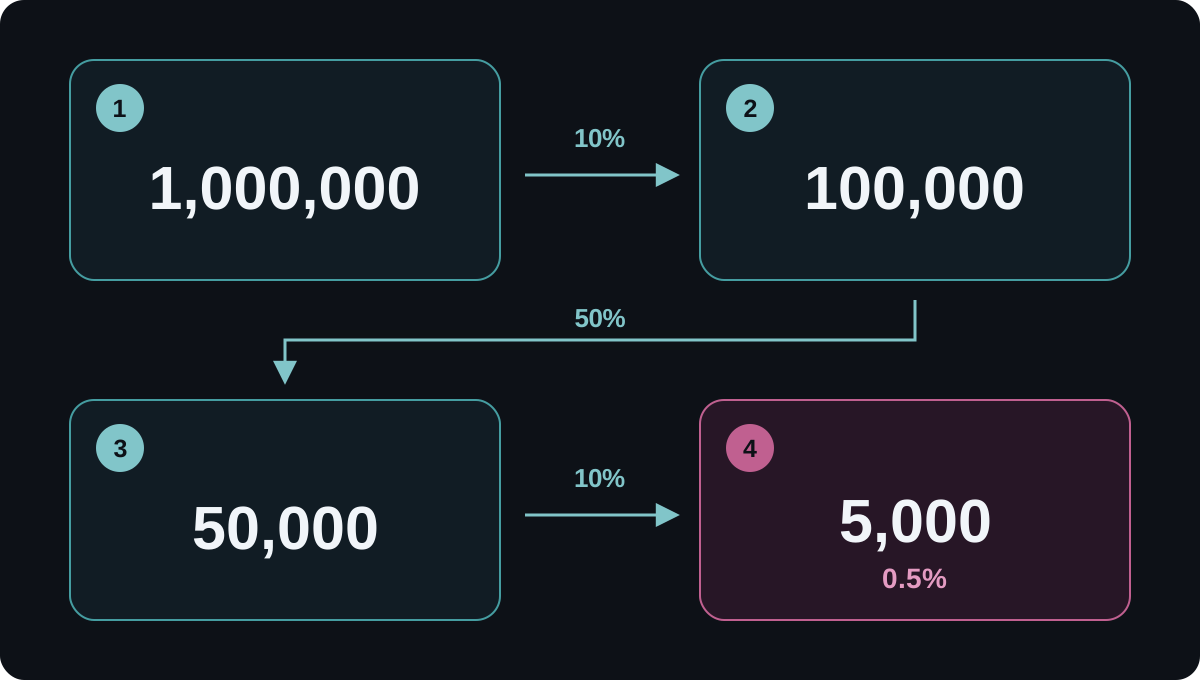
A retention rule can preserve an ingested failure for longer. It cannot recover an execution discarded before upload. If a named workflow requires guaranteed tracing, define that policy before execution with conditional tracing and an appropriately configured client. Do not claim that random sampling captures every future error.
Our recommendation is to track application executions, accepted traces, eligible roots, successful scores and failed evaluations separately. Put the filter and evaluator version beside any quality percentage. For judge validity and rubric design, use the existing LLM evaluation cost and ROI guide.
How much does this LangSmith retention policy cost?
The current self-serve pricing page lists one LSU at $1, a base trace at 0.005 LSU, and an extended upgrade at an additional 0.0025 LSU. That is $5 per 1,000 base traces plus $2.50 per 1,000 upgrades. Plus costs $39 per seat per month and includes 10,000 base traces; Developer includes 5,000 base traces and one free seat.
Apply those rates to the example above. Assume one Plus seat, allocate its 10,000 included base traces to this application, and assume no extra credits, discounts or upgrade allowance. The allowance is not a fresh allocation for every project. Compare keeping all 5,000 evaluated traces with retaining only the selected 1,000. Both policies still ingest 100,000 traces and produce 5,000 scores.
| Line item | Extend all scored traces | Extend selected subset |
|---|---|---|
| One Plus seat | $39.00 | $39.00 |
| 90,000 billable base units | 90,000 × $0.005 = $450.00 | $450.00 |
| Billable upgrade units | 5,000 × $0.0025 = $12.50 | 1,000 × $0.0025 = $2.50 |
| Application-trace subtotal plus seat | $501.50 | $491.50 |
The difference is $10, not an 80% reduction in the whole bill. Selective retention reduces upgrade units by 80% here, while the base ingestion charge remains unchanged. Its more important operational effect may be reducing the amount of long-lived evidence to the traces the team intentionally needs.
base_units = max(100_000 - 10_000, 0)
seat_cost = 39
for upgrade_units in (5_000, 1_000):
    subtotal = seat_cost + base_units * 0.005 + upgrade_units * 0.0025
    print(f"USD {subtotal:.2f}")
# USD 501.50
# USD 491.50
This calculation assumes upgrades occur in the same billing month, with no backfill, thread expansion or other retention rules. Base ingestion and a later upgrade can fall into different billing periods. Count the union of upgraded trace IDs rather than summing overlapping rule matches.
The October plan migration has exceptions for accounts with contracts, credits or price adjustments. Enterprise and self-hosted pricing can use a flat trace rate without this surcharge. Confirm your account's terms before applying the example. These are application-trace subtotals, not a complete platform invoice. Extra traces emitted by evaluator executions or other workloads, model calls, LLM judge usage, other evaluator services, Deployment, Engine, taxes and staff time are excluded. For the entire business workflow, measure cost per accepted agent outcome.
Why did LangSmith evaluations stop while the application kept running?
A tracing quantity limit and an evaluator spending cap govern different operations. A missing score needs a reason; it is not a passing evaluation.
| Control | What it limits | Expected consequence |
|---|---|---|
| Monthly all-traces limit | Trace ingestion quantity | Further ingestion can be rejected; inspect upload errors and 429 responses. |
| Monthly extended-traces limit | New extended-retention traces | Actions requiring a new upgrade are blocked; actions with extension disabled can continue. |
| Weekly evaluator spend cap | LLM scoring spend on one evaluator attachment | Scoring pauses on that project or dataset; the application and trace continue. |
At the extended limit, UI feedback and manual queue additions can still work because they leave retention unchanged. The same applies to evaluators and rules with extension disabled. Trace quantity limits are approximate and are not a cap on every LangSmith product or on your model provider's invoice.
The evaluator spend documentation adds an easy-to-miss distinction: the organization default is inherited per evaluator attachment to a project or dataset. A $20 default applied to three attachments is not a pooled $20 organization budget. Each attachment has its own cap.
These weekly limits reset on Monday at 00:00 UTC. In-flight scoring can overshoot slightly, and enforcement requires a supported model with pricing configured. Check attachment status and evaluator logs before changing a filter to “fix” absent scores. Lowering the model's estimated price to avoid a cap would also make the spend measurement misleading.
Does trace expiration delete a LangSmith dataset example?
No. Copied dataset examples have a separate lifecycle. The billing and retention guidance explicitly describes saving inputs and outputs in a dataset so they remain available after the source trace expires. A 14-day trace policy is therefore not a 14-day policy for every copy of the content.
Dataset history also matters. According to LangSmith's deletion documentation, soft deletion preserves historical versions; hard deletion removes the selected examples' inputs, outputs and metadata across those versions. Treat deletion as a separate workflow with its own verification.
For each curated example, record its purpose, source trace ID, dataset/version, owner and review or deletion deadline. Saving an input/output pair does not preserve the complete nested trace tree. Keep the specific evidence needed for an incident or regression, and test what remains accessible after each retention boundary.
A practical LangSmith production configuration
The following is a proposed rollout sequence. Adjust it to the workflow's evidence requirements and verify it with synthetic records before relying on it.
- Separate environments and set the future default. Record whether the production project or agent environment starts at base or extended retention. Keep its configuration alongside the application release.
- Choose what may leave the application. Define sensitive-data exclusions before sampling. The input/output masking controls do not automatically remove every metadata field. A judge cannot assess content that its input does not contain. Check a representative sanitized trace and the evaluator's mapped variables.
- Set ingestion and scoring independently. Document the SDK sample, root-run filter, evaluator sample and each attachment's spend cap. Keep full-workflow counters outside the sampled trace population.
- Choose retention intentionally. If the workflow permits it, leave routine scoring on base and extend a defined investigation subset. Review every overlapping rule, including thread actions, and give manual review a deadline.
- Verify expected state changes. Send synthetic success, error and sensitive-input cases through the intended paths. Check ingestion, scoring, retention and dataset copies separately. Confirm the invoice quantities against accepted traces and unique upgrades.
- Alert on missing evidence. Track ingestion errors, evaluator failures, paused attachments and score coverage. Assign ownership for expiring traces and dataset deletion.
For implementation details beyond these LangSmith settings, our PII redaction pipeline guide covers sensitive-data handling. Teams already investigating an existing LiteLLM stack can use the separate LiteLLM Lens trace-analysis guide.
A successful rollout makes it possible to answer four concrete questions: what did we record, what did we score, what will still exist when someone needs it, and what did those choices cost? Wavect's AI integration service can help connect those settings to the surrounding application and review process.